What Is a Webhook? A Plain-English Guide
Webhooks are how systems tell each other something happened — the moment it happens. How they work, how to secure them, and what to do when deliveries fail.
Say your document system finishes analyzing a file at 2:14 p.m. How does the rest of your software — the ERP, the Slack channel, the case tracker — find out?
Option one: it asks. Every few minutes it calls the API and says "anything new?" That's polling, and it's how plenty of integrations still work. Mostly wasted calls, with news always arriving a little late.
Option two: the document system calls you at 2:14, the moment it happens. That's a webhook.
The one-sentence version
A webhook is an HTTP request one system sends to another when an event occurs — push instead of pull, "I'll call you" instead of "keep checking."
The doorbell analogy holds up well. Polling is opening your front door every five minutes to see whether anyone's standing there. A webhook is the bell: it rings when someone arrives, and only then.
Webhooks vs. polling
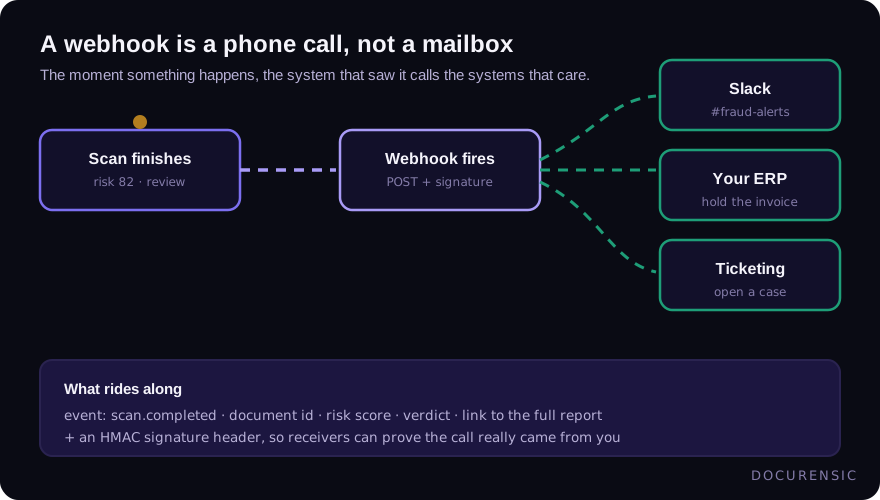
Polling isn't wrong; it's just expensive in the two currencies integrations care about — latency and load. Poll every ten minutes and your average notification is five minutes stale. Poll every ten seconds and you're making thousands of calls a day to hear "nothing yet."
Webhooks flip the cost. Deliveries happen only when there's news, and latency drops to roughly nothing. The trade is that you now operate a small piece of infrastructure: an endpoint that has to be reachable, fast, and secure. The rest of this guide is about doing that well.
Anatomy of a delivery
A typical webhook delivery is a POST request with a JSON body that looks something like this:
{
  "id": "evt_8f3a2c",
  "type": "scan.completed",
  "created_at": "2026-06-02T14:14:09Z",
  "data": {
    "document": "invoice_1042.pdf",
    "risk_score": 72,
    "verdict": "review"
  }
}
Field names vary by provider; the shape rarely does. There's an event id, an event type, a timestamp, and a payload. That shape points straight at your endpoint's three jobs:
- Acknowledge fast. Return a 2xx within a few seconds. Senders time out, and a slow endpoint gets treated as a dead one.
- Do the real work later. Drop the event on a queue and process it asynchronously. Never run a heavy job inside the request handler.
- Expect repeats. Retries mean the same event will eventually arrive twice. Deduplicate on the event id, and design handlers so processing twice is harmless.
Keeping webhooks secure
An endpoint that accepts POSTs from the internet is a door, so treat it like one.
- Verify signatures. Good senders sign each delivery with a shared secret (usually an HMAC in a header). Verify before you trust a byte of the payload. An unsigned webhook feed is just a suggestion box.
- HTTPS only. Event payloads routinely carry business data; they shouldn't cross the wire in the clear.
- Treat payloads as untrusted input even after the signature checks out. Validate types and ranges before acting — the sender being authentic doesn't make the data well-formed.
- If you're the one sending webhooks, there's a mirror-image duty: destination URLs are user-supplied, so guard against them pointing at your own internal network. Server-side request forgery through a webhook configuration screen is a classic.
When deliveries fail
Endpoints go down. Deploys break routes. DNS misbehaves. A well-built sender retries failed deliveries with increasing delays over hours or days — but retries only help if you've done your part:
- Be idempotent. Once dedup is in place, retries are free instead of dangerous.
- Monitor for silence. Alert when a normally chatty feed goes quiet; silence is a failure mode that no retry fixes.
- Reconcile occasionally. A daily sweep that asks the API "what did I miss?" is the belt-and-braces pattern: webhooks as the primary channel, polling demoted to a safety net.
Webhooks in document workflows
Document work is asynchronous by nature. A file arrives, checks run, and somewhere between seconds and minutes later there's a result worth acting on. Webhooks are the natural spine for that: a scan.completed event carrying a verdict can hold a payment, open a case, or ping the right channel without anyone refreshing a dashboard.
If you're wiring one up against an API, our integration guide covers the request side, and the developer overview covers events end to end.
Frequently asked questions
Is a webhook an API?
It's the same technology pointed the other way. With an API, you call the provider when you want something. With a webhook, the provider calls you when something happens. Mature integrations almost always use both: API for actions, webhooks for news.
What happens if my endpoint is down?
A reasonable sender retries with backoff for a window — commonly somewhere between a few hours and a few days — then gives up on that delivery. Check your provider's documented retry policy, and pair webhooks with an occasional reconciliation poll so a long outage can't silently swallow events.
How do I test webhooks locally?
Use a tunnel tool that exposes a local port at a temporary public URL, point the sender's test mode at it, and fire sample events. Most senders offer a "send test event" button or CLI. Log the raw request the first time — seeing real headers and payloads beats reading about them.
Put it to the test
Scan a document and get a plain-English verdict in seconds. Free to start.
Keep reading
OCR vs Document Forensics: Reading Isn't Verifying
OCR tells you what a document says. It has nothing to say about whether it's real. Why extracting a document isn't verifying it — and why you need both, in order.
Automated Invoice Processing Without the Fraud Blind Spot
AP automation removes keystrokes — and removes the human glance that used to catch fakes. How to keep straight-through processing from becoming straight-through fraud.
Choosing a Document Verification API: An Integration Guide
What a document verification API actually returns, how to wire one into your intake flow, and the questions worth asking before you commit to a provider.