Vendor Bank Account Change Requests: The 60-Second Check
The most expensive AP fraud isn't a fake invoice — it's a real one paid to a fraudulently changed bank account. The one habit that stops payment-redirection fraud.
In this guide
There's an email in your accounts-payable inbox right now that could cost more than any invoice fraud you'll see all year, and it looks completely ordinary. "Hi — we've switched banks, please update our details for the next payment." One vendor, one form, one new account number. If that request is fake and you act on it, the next legitimate invoice you pay goes straight to a fraudster, and the real vendor is still expecting their money.
Payment-redirection fraud is quiet, high-dollar, and almost entirely preventable with one habit. Here's the habit.
Key takeaways
- The most expensive AP fraud isn't a fake invoice — it's a real invoice paid to a fraudulently changed bank account.
- The attack rides on a legitimate, trusted workflow, so it clears every check that only asks "is this a real vendor?"
- Verify every banking-detail change out-of-band, using contact details you already had — never the ones in the request.
- Treat the change request document itself as evidence: forged letterhead and altered forms leave forensic tells.
Why this beats your normal controls
Your invoice controls are built to answer "do we owe this vendor this money?" For a bank-change attack, the answer is yes — you genuinely owe the vendor, the invoice is often real, the amount is expected. Nothing about the payment looks wrong except the destination. That's why three-way matching, PO checks, and duplicate-invoice detection all wave it through. They're guarding the wrong question.
The request usually arrives one of two ways. Either a fraudster spoofs or compromises the vendor's email and sends a "we changed banks" note, or they submit a forged bank-detail update form on convincing letterhead. Both exploit the same thing: a routine, low-friction change that everyone processes on autopilot.
Step 1: Freeze on any banking change
Train the reflex: the words "update our bank details" stop the process. Not "slow it down" — stop it. No payment goes to a new account until the change is independently verified. This single pause defeats the majority of these attacks, because the fraud depends on urgency and routine. A held payment costs you a day. A redirected one costs you the invoice.
Step 2: Verify out-of-band, with details you already had
This is the whole ballgame, and it's where teams get it subtly wrong. Call the vendor to confirm — but call the number already on file from before this request arrived, never a number in the request itself. Fraudsters helpfully include their own "accounts department" phone number precisely so you'll "verify" with them.
Use a channel and a contact the attacker doesn't control:
- A phone number from a prior, trusted record — not the email signature on the change request.
- A known contact you've dealt with before, by name.
- Your existing vendor portal, if the vendor manages their own details there.
Confirm the new account verbally, person to person. Document who you spoke to and when.
Step 3: Read the request document like it's evidence
The change often comes as an attachment — a letter, a form, a "voided check." Treat it as a document to be authenticated, not a formality to be filed. Forged letterhead, a logo pulled at the wrong resolution, a signature that's clearly pasted, or a PDF whose metadata says it was authored in editing software rather than issued by the vendor are all tells. A genuine bank letter and a fabricated one look identical at a glance and quite different under a forensic check.
This matters because the same fraud sometimes skips email entirely and comes in as a polished document through your portal. If the only thing standing between you and the redirect is "the form looked official," you don't have a control — you have a hope.
Step 4: Make verification a required, logged step
Individual vigilance fades under volume. Put the control in the process:
- A mandatory verification checkbox on any banking-detail change, with the verifier and method recorded.
- Separation of duties — the person who can change vendor bank details isn't the person who releases the payment.
- A short cool-down on the first payment to any newly changed account, so an unverified change can't be exploited the same day.
- An automated flag when a payee's bank details change, routing it for confirmation before the next run.
The goal is that the safe path is the default path, not a thing a careful person remembers to do. This is where workflow automation pays off: the check lives inside the payment pipeline, so it can't be skipped by a busy Tuesday.
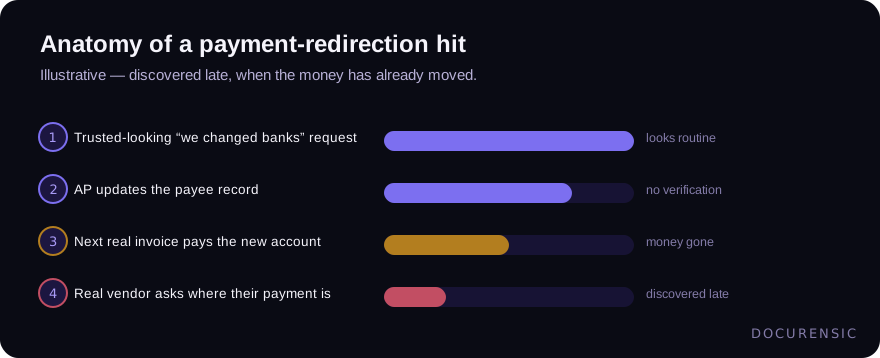
The tragedy of that timeline is how late step 4 arrives. By the time the real vendor chases their overdue payment, the funds have usually moved on, and recovery is a race you started days behind.
What "good" looks like
A mature AP function treats every banking change as a small investigation with a fixed, boring procedure: stop, verify out-of-band against prior records, authenticate the supporting document, log it, and hold the first payment. It's unglamorous and it's the reason their worst month is a delayed payment instead of a six-figure wire to nowhere. Pair it with strong vendor onboarding and inbound invoice checks, and the redirect attack runs out of doors to knock on.
Frequently asked questions
How do I verify a vendor bank account change safely?
Contact the vendor using details you already had on file before the change request arrived — a known phone number or a prior contact — never the phone or email in the request itself. Confirm the new account verbally, record who you spoke to, and hold the first payment to the new account briefly as a backstop.
Isn't a request on official letterhead proof enough?
No. Letterhead is trivial to copy, and forged bank-change forms are a common vector. Treat the document as evidence to authenticate — check for pasted signatures, wrong-resolution logos, and metadata showing it was authored in editing software rather than issued by the vendor — and still verify out-of-band regardless of how official it looks.
Why do normal invoice controls miss this fraud?
Because they answer "do we owe this vendor?" — and for a redirect attack, you genuinely do. The invoice and amount are often real; only the destination account is fraudulent. Duplicate detection and three-way matching don't examine whether a banking change was legitimate, so the payment clears every check and still goes to the wrong place.
Put it to the test
Scan a document and get a plain-English verdict in seconds. Free to start.
Keep reading
Wire Fraud: What to Do in the First 72 Hours
Almost everything that works on a fraudulent transfer works in the first day. Almost nothing works after the third. Here is the order to work in when it has already happened.
Fake Proof of Payment: The Screenshot That Buys Three Days
Nobody fakes a payment to steal money. They fake it to buy time — long enough to collect the goods and be somewhere else when the bank tells you nothing arrived.

One Character Off: How Lookalike Domains Get Paid
The most effective domain in payment fraud is not a hacked one. It is a real domain, correctly configured, that differs from your supplier's by a single character nobody reads.