EXIF Data: What a Photo Quietly Reveals About a Claim
A photo carries a hidden layer of data — when, where, and with what it was taken. How EXIF corroborates a claim or contradicts it, and why missing metadata isn't a verdict.

A photo submitted as evidence is doing two jobs at once. There's the picture — the dented fender, the water-damaged floor, the delivered package — and there's a hidden layer of data the camera wrote into the file at the moment of capture. That hidden layer is EXIF, and it quietly records when the photo was taken, sometimes where, with what device, and what happened to the file afterward. In claims, disputes, and any process where a photo is supposed to prove something, the EXIF data often tells a truer story than the image.
Key takeaways
- EXIF is metadata embedded in photos: capture date/time, device, camera settings, and often GPS location.
- It's powerful for verifying when and where a photo was really taken — or catching when the story doesn't match.
- Missing or stripped EXIF isn't proof of fraud, but it removes a photo's ability to corroborate itself.
- Edited photos frequently reveal the edit in metadata even when the image looks flawless.
What EXIF actually records
When a camera or phone captures an image, it writes a block of metadata into the file. Depending on the device and settings, that can include:
- Capture timestamp — when the photo was taken, per the device's clock.
- GPS coordinates — where it was taken, if location was enabled.
- Device make and model — the camera or phone that shot it.
- Camera settings — exposure, focal length, and other technical details.
- Software traces — whether the file has since passed through editing software.
None of this is visible in the picture. All of it is readable from the file. That gap — between what the image shows and what the file records — is where photo forensics lives.
Why it matters for a claim
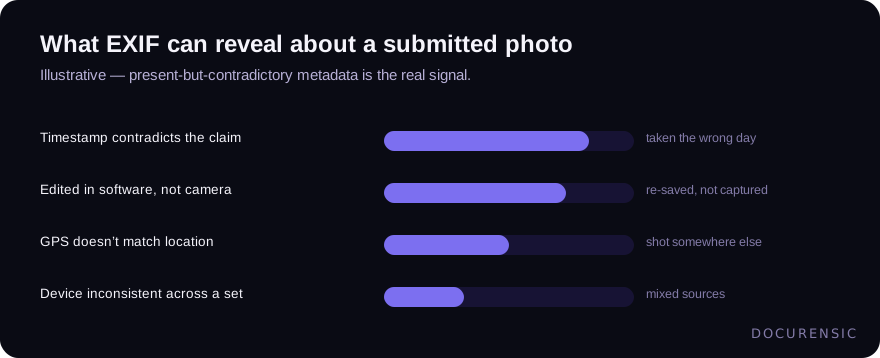
Consider an insurance photo meant to document damage. The claim says the damage happened last Tuesday. The EXIF timestamp says the photo was taken three weeks earlier — or, more tellingly, that the file was last saved by photo-editing software rather than written straight from a camera. Neither fact is visible in the image. Both change how much you trust it.
The value isn't that EXIF proves fraud by itself. It's that it lets a photo corroborate its own story — or fail to. A genuine photo of genuine damage, taken when and where the claim says, will usually carry EXIF that's consistent with that account. A photo pulled from elsewhere, taken at the wrong time, in the wrong place, or run through an editor, often carries EXIF that quietly contradicts the claim. This is the same fabrication-detection discipline that runs through claims work generally, applied to the photo layer.
The catch: missing EXIF isn't a verdict
Here's where you have to stay honest. EXIF is fragile. It gets stripped by messaging apps, removed when a photo is screenshotted, dropped by social platforms, and lost in some upload flows — all for entirely innocent reasons. So a photo without EXIF is not a fraudulent photo. It's a photo that can no longer corroborate its own timing and location, which is a different and weaker statement.
Treat EXIF as a source of positive corroboration when it's present and consistent, and as neutral when it's absent. The failure mode is concluding "no metadata, therefore fake." Plenty of honest photos arrive stripped by the pipe they traveled through. What deserves scrutiny is EXIF that's present and contradictory — a timestamp or location that fights the claim — not EXIF that's simply gone.
Beyond metadata: the pixels tell tales too
EXIF is one layer. The image content itself carries forensic signal independent of the metadata — signs an image was edited or composited, regions that were cloned or pasted, compression artifacts that don't match a single-capture photo. A sophisticated fabricator might scrub or fake the EXIF, which is exactly why you don't rely on it alone. When metadata and pixel-level analysis agree, you have a strong read; when a photo has clean metadata but the pixels show editing, the metadata was the easier thing to fake.
Using it well
Fold EXIF into a broader read of any photo that's doing evidentiary work. Where present, check that timestamp, location, and device are consistent with the claim and with each other across a set of photos. Where absent, don't over-read it — lean on the image analysis instead. And for anything high-stakes, combine both layers rather than trusting either alone. A photo is a document like any other: it has a visible story and a hidden history, and the hidden history is often the more honest of the two.
Frequently asked questions
What is EXIF data in a photo?
EXIF is metadata embedded in image files at capture, typically including the date and time taken, the device make and model, camera settings, and often GPS coordinates. It's invisible in the picture itself but readable from the file, which makes it useful for verifying when and where a photo was really taken.
Does missing EXIF data mean a photo is fake?
No. EXIF is routinely stripped for innocent reasons — messaging apps, screenshots, social platforms, and some upload flows all remove it. Absent metadata simply means the photo can't corroborate its own timing and location, not that it's fraudulent. What's genuinely suspicious is EXIF that's present but contradicts the claim.
Can EXIF data be faked?
Yes — metadata can be edited, so a determined fabricator can alter or scrub it. That's why EXIF isn't relied on alone. Pixel-level image analysis detects editing and compositing independently of the metadata, so when the two layers agree you have a strong result, and when clean metadata sits on visibly edited pixels, the metadata was the easier thing to forge.
Have the image examined
Upload the picture and Docurensic runs error-level analysis, JPEG-ghost, copy-move and noise-floor checks on it, and reads its camera and editor record. Free to start.
Keep reading

Copy-Move Forgery: The Most Common Image Edit Nobody Notices
Cloning a region of the same image is the forger's favorite move — the borrowed pixels come pre-matched. How copy-move detection works, and where it shows up in documents.

How to Tell if an Image Has Been Photoshopped
Edges, lighting, metadata, reverse search, and error level analysis: a working sequence for checking whether an image has been edited — and knowing when you need tooling.
Error Level Analysis (ELA), Explained — and Why It's So Often Misread
ELA is the most famous technique in image forensics and probably the most misused. What it actually measures, what a hot spot really means, and how professionals keep it honest.