Copy-Move Forgery: The Most Common Image Edit Nobody Notices
Cloning a region of the same image is the forger's favorite move — the borrowed pixels come pre-matched. How copy-move detection works, and where it shows up in documents.

If you were going to alter an image and wanted the edit to survive scrutiny, you'd face a matching problem. Paste in content from another photo and you inherit its lighting, its noise, its compression history — three things that never quite match the destination, and three things forensic analysis looks for first.
Unless you don't paste from another photo. Paste from the same one.
That's copy-move forgery: cloning a region of an image onto another part of the same image. Cover an inconvenient line item with a patch of nearby blank paper. Duplicate a crowd to make it bigger. Stamp the same signature twice. It's the most common manipulation in practice for a simple reason — the borrowed pixels come pre-matched. Same sensor noise, same lighting, same compression. The usual tells don't tell.
Why the forger's favorite is also findable
Copy-move's strength is its weakness. The clone matches its source too well — somewhere in that image are two regions that agree with each other more than nature allows. Real scenes almost never contain pixel-level duplicates: even visually repetitive texture (grass, gravel, paper grain) differs microscopically patch to patch. A cloned patch doesn't. The manipulation that defeats lighting-and-noise analysis creates the one statistical anomaly a search can hunt: impossible self-similarity.
How detection actually works
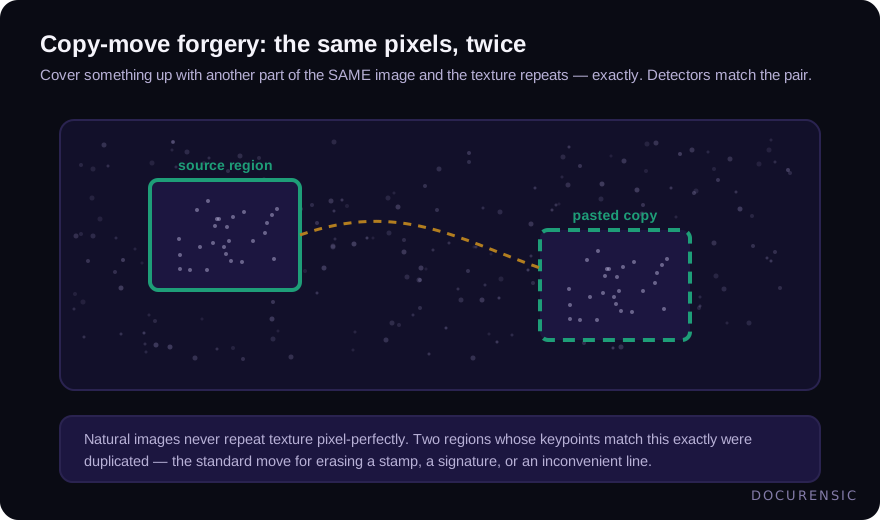
Two families of technique, usually run together.
Block matching slides a small window across the image, computes a compact signature for every block, sorts the signatures, and looks for pairs that collide. Robust variants use transforms that survive mild blur and recompression rather than raw pixels. Block matching excels at finding large, plain cloned areas — the patch of "blank paper" pasted over text.
Keypoint matching finds distinctive features (corners, edges, texture landmarks) and matches them against each other within the image — the same machinery as panorama stitching, pointed inward. Because keypoints carry orientation and scale, this branch catches clones that were rotated, resized, or flipped before pasting, which defeats naive block comparison.
Either way, the output isn't a verdict — it's a pair of regions with a geometric relationship. That specificity is what makes copy-move findings so usable: not "this image seems edited" but "this exact patch appears twice, here and here."
Where it shows up in documents
Copy-move started as a photo-forensics topic, but document fraud leans on it constantly:
- Cloned stamps and seals. One genuine stamp, lifted and placed on a page (or a document) it never touched.
- Duplicated signatures. The same ink signature appearing twice with identical stroke geometry — real hands never repeat themselves exactly.
- Erasure by texture. The most common one: a rectangle of clean paper background cloned over a line item, a date, a name. The "blank" area matches some other blank area perfectly.
- Repeated table content. A transaction row or amount duplicated to inflate a statement — the kind of edit that pairs with other tampering signals when the file's structure is examined too.
On scanned or photographed documents, copy-move analysis is often the only pixel-level lens available — there's no PDF structure to inspect, just the image.
The honest limits
Uniform backgrounds generate false matches — sky, blank paper, and studio backdrops genuinely do self-repeat, so detectors suppress flat regions and tune thresholds accordingly. Heavy recompression or aggressive downscaling can wash out the signal. And a sophisticated edit that clones, then adds noise, warps slightly, and recompresses can slip below thresholds.
So a detected match is a flag, not a conviction — the right response is corroboration. Does the matched region sit exactly where a line item should be? Does the metadata story hold up? Do the document's contents reconcile? Copy-move findings are strongest as the anchor of a case, not the whole case.
Frequently asked questions
What is copy-move forgery in one sentence?
Editing an image by cloning a region of that same image onto another part of it — hiding or duplicating content with pixels that automatically match the scene's lighting, noise, and compression.
Does copy-move detection survive screenshots and recompression?
Moderately well. The duplicated regions still match each other after a screenshot or re-save — both copies degrade together — so strong clones remain findable. Very heavy compression or downscaling shrinks the signal, and small clones can drop below detection thresholds.
Is a detected copy-move match proof of fraud?
No — it's proof that two regions of the image are improbably identical. Flat textures can self-match innocently, and some legitimate processing (watermark tiling, scanner artifacts) repeats content. What makes it damning is placement and corroboration: a perfect self-match sitting exactly over a disputed amount, in a file whose other signals point the same direction.
Have the image examined
Upload the picture and Docurensic runs error-level analysis, JPEG-ghost, copy-move and noise-floor checks on it, and reads its camera and editor record. Free to start.
Keep reading

EXIF Data: What a Photo Quietly Reveals About a Claim
A photo carries a hidden layer of data — when, where, and with what it was taken. How EXIF corroborates a claim or contradicts it, and why missing metadata isn't a verdict.

How to Tell if an Image Has Been Photoshopped
Edges, lighting, metadata, reverse search, and error level analysis: a working sequence for checking whether an image has been edited — and knowing when you need tooling.
Error Level Analysis (ELA), Explained — and Why It's So Often Misread
ELA is the most famous technique in image forensics and probably the most misused. What it actually measures, what a hot spot really means, and how professionals keep it honest.