Error Level Analysis (ELA), Explained — and Why It's So Often Misread
ELA is the most famous technique in image forensics and probably the most misused. What it actually measures, what a hot spot really means, and how professionals keep it honest.
Error level analysis has a strange reputation. In amateur hands it's a magic tamper-detector that "proves" any image fake; among some professionals it's dismissed entirely because of how often it's over-read. The truth sits in the middle: ELA is a genuinely useful lead generator that should almost never be the whole argument.
Here's what it actually does, in plain terms.
The idea in one paragraph
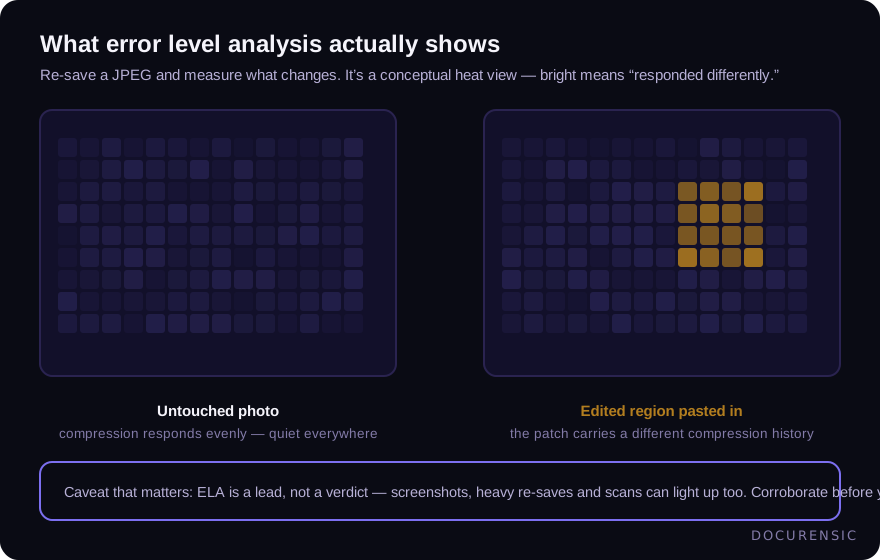
JPEG compression is lossy: every save throws information away. Crucially, the loss isn't uniform — a region that's been through compression once responds differently to being compressed again than a region that's been through it five times. ELA exploits this: re-save the image at a known quality and measure, pixel by pixel, how much changed. Regions with a different compression history than their surroundings stand out.
Why does that catch edits? Because a pasted patch — a new price on a receipt photo, a swapped face, an inserted stamp — usually arrives with a different compression history than the image it lands in. Re-save the composite, and the patch responds differently from everything around it.
What a bright region actually means
This is where ELA gets misread. Bright means: this region responded differently to recompression. That is all it means. Edited regions do that — and so do several innocent things:
- Sharp edges and text. High-contrast detail always "lights up" relative to smooth areas. Text on a document photo glows in every ELA, edited or not.
- Prior processing. Crops, filters, platform re-encodes (messaging apps recompress everything) reshape error levels globally.
- Uniform history. And the inverse trap: an image that's all fresh — a screenshot, a fully regenerated fake — shows a boringly uniform ELA precisely because everything shares one history. Uniform doesn't mean untouched.
So the discipline is comparative, not absolute: does a region respond differently from materials that should match it? A pasted number glowing against same-font text beside it means something. Text glowing against a smooth background means nothing.
How it's used properly
In serious image forensics, ELA is one voice in a chorus. A responsible pipeline runs it alongside independent techniques that don't share its failure modes — clone detection (the same pixels appearing twice), resolution and noise-pattern analysis across region boundaries, lighting-direction consistency, and the file-level evidence (metadata, editing-software traces) that images carry just like PDFs do.
Agreement is the standard. An ELA hot spot plus a resolution seam at the same boundary plus a file that's been through an editor reads very differently from any one alone. That corroboration requirement isn't caution for its own sake — it's what keeps the false-positive rate survivable at business volume, where an over-eager detector flags every fifth honest receipt photo.
Practical notes if you try it yourself
Free ELA tools are everywhere and worth playing with — with three habits. Work on the most original file you can get (every re-share degrades the signal; a WhatsApp-forwarded image is nearly useless). Compare like with like — judge text against text, smooth against smooth. And treat every finding as a question, not an answer: "why does this region differ?" sometimes has the answer "because someone edited it," and often has a duller one.
For anything with money attached, run the whole battery instead: a document scanner that fuses image-level checks with structure and metadata will tell you not just that a region is odd, but whether the file's broader story corroborates it.
Frequently asked questions
Is ELA reliable on its own?
No — and that isn't a knock. It surfaces leads cheaply; it just can't distinguish "edited" from "different for a boring reason" without corroboration. Use it to decide where to look, not what to conclude.
Does ELA work on PNGs or screenshots?
Poorly. ELA is a JPEG-history technique; lossless formats and single-generation screenshots don't carry the layered compression history it reads. Other techniques (noise analysis, clone detection, metadata) do the work there.
Can ELA detect AI-generated images?
Not in the way people hope. A wholly generated image has one uniform compression history — nothing to contrast. Generated-image detection leans on different evidence entirely (model artifacts, frequency patterns, provenance metadata).
Why do all the text areas glow in my ELA?
Because high-contrast edges always recompress differently than smooth regions. That's the single most common over-read: glowing text on a document photo is expected, not incriminating. Look instead for one text region behaving unlike its typographic neighbours.
Have the image examined
Upload the picture and Docurensic runs error-level analysis, JPEG-ghost, copy-move and noise-floor checks on it, and reads its camera and editor record. Free to start.
Keep reading
EXIF Data: What a Photo Quietly Reveals About a Claim
A photo carries a hidden layer of data — when, where, and with what it was taken. How EXIF corroborates a claim or contradicts it, and why missing metadata isn't a verdict.
Copy-Move Forgery: The Most Common Image Edit Nobody Notices
Cloning a region of the same image is the forger's favorite move — the borrowed pixels come pre-matched. How copy-move detection works, and where it shows up in documents.
How to Tell if an Image Has Been Photoshopped
Edges, lighting, metadata, reverse search, and error level analysis: a working sequence for checking whether an image has been edited — and knowing when you need tooling.