PDF Metadata: What It Reveals and How to Read It
Every PDF carries two hidden records about where it came from. Here's how to read the Info dictionary and the XMP packet, what each field means, and the disagreement that exposes tampering.
PDF metadata is the quiet witness inside every document. It records when a file was created, what software made it, and when it was last touched — and because it travels with the file, it frequently contradicts the story a forged document is trying to tell.
Reading it takes about a minute once you know where to look.
The two records every PDF carries
A PDF doesn't have one metadata record. It has two, written by different generations of software, and they're supposed to agree.
The first is the Info dictionary — the classic block of key-value pairs: /Title, /Author, /Producer, /CreationDate, /ModDate. This is what most PDF readers show under "Document properties."
The second is the XMP packet, an XML block embedded in the file that repeats the same facts in a richer format (xmp:CreatorTool, xmp:CreateDate, xmp:ModifyDate, and often a full editing history).
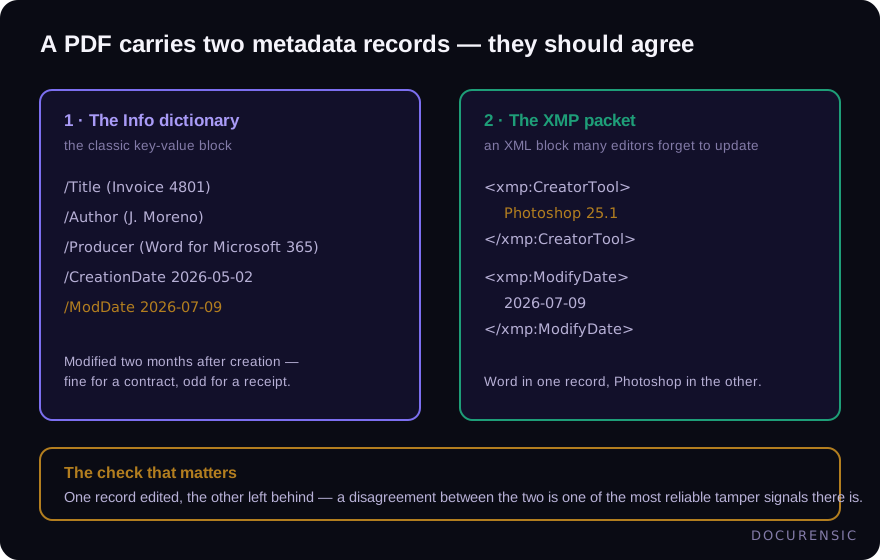
Why two? History. XMP came later, and well-behaved software updates both. Sloppy software — and sloppy forgers — update one and forget the other. That's worth remembering; we'll come back to it.
What each field actually tells you
CreationDate and ModDate. The pair that starts most investigations. Created and modified at the same second usually means a single clean export. A ModDate hours or days later means the file was opened and saved again by something. Whether that matters depends entirely on what the document claims to be — amended contracts get modified; freshly-issued receipts shouldn't.
One nuance worth knowing: these timestamps include a timezone offset. A document supposedly issued by a Denver company whose timestamps carry a UTC+3 offset has some explaining to do.
Producer and Creator. Creator is the application the document was authored in ("Microsoft Word"); Producer is the library that wrote the actual PDF bytes ("Word for Microsoft 365", "wkhtmltopdf", and so on). Real business documents have believable pairs. A bank statement whose Producer is an image editor does not.
Title and Author. Often auto-filled from the source file — which is how you end up with an "invoice" whose title is still template_v3_FINAL(2).docx, or an author name that belongs to neither the vendor nor anyone you've heard of. People forget these fields exist. That's what makes them useful.
The disagreement check
Here's the highest-value sixty seconds in metadata forensics: compare the two records against each other.
Because many editing tools update the Info dictionary but leave the XMP packet stale (or the reverse), a file that's been quietly modified often ends up with — for example — Word in one record and a photo editor in the other, or a ModDate that only one of the two records knows about.
There's almost no innocent way for the two records to disagree about what tool made the file. It's one of the most reliable tamper signals there is, and it's completely invisible in a normal PDF viewer.
How to actually look
- Any PDF reader: File → Properties gets you the Info dictionary basics. Good enough for date checks.
- Command line:
exiftool document.pdfprints both records, including the XMP fields readers hide. This is the fastest manual route. - Automated scanning: a document scanner reads both records on every file, cross-checks them against each other and against the document's visible content, and flags contradictions without anyone remembering to look.
The honest caveats
Metadata can clear a document's dates and origin story, and it can condemn them — but two limits matter.
First, metadata can be edited too. A careful forger can set every field to something plausible (though doing it perfectly, in both records, with consistent timezone offsets, is harder than it sounds — and wiping metadata entirely is its own red flag on a document that should have some).
Second, absence isn't innocence. Plenty of legitimate pipelines strip metadata. A blank record tells you nothing either way; it just moves the burden onto the other checks — structure, fonts, and content.
Frequently asked questions
Can PDF metadata be faked?
Yes — the fields are editable with the right tools. But faking it consistently across the Info dictionary, the XMP packet, and the file's structural timestamps is genuinely difficult, and most forgers don't bother. Treat clean metadata as supporting evidence, never as proof by itself.
Does removing metadata make a document suspicious?
Context decides. A privacy-conscious company stripping metadata from a published report is normal. An invoice or bank statement with no creation record, when every other document from that source has one, is an anomaly worth noting.
What's the difference between the Info dictionary and XMP?
Same facts, two formats. The Info dictionary is the original key-value block; XMP is the newer XML packet with richer fields. Well-behaved software keeps them in sync — which is exactly why a mismatch between them is such a strong editing signal.
Can I check metadata without installing anything?
Your PDF reader's document-properties panel covers the basics. For the full picture including XMP, upload the file to a scanner that reads both records and explains any contradictions it finds.
Check the PDF you are holding
Run a free PDF X-Ray in your browser — it recovers text from the file’s earlier revisions, so you can see what a value was before it was changed. No account needed.
Keep reading
When Was This Really Made? A Field Guide to Document Time
Documents carry more clocks than people expect — and fraud usually breaks at least one. Where timestamps live, which ones lie easily, and how to read them together.
The Document Forensics Glossary, in Plain English
Fifty-plus terms from PDF structure, image forensics and the signature world, defined for the person reading a forensic report rather than writing one — including what each one does not mean.
The Free Document Forensics Toolkit
ExifTool, pdfid, qpdf, mutool, FotoForensics and the rest — what you can genuinely establish about a suspicious document with software that costs nothing, in what order, and the four things free tooling cannot do.