9 Invoice Fraud Red Flags Every AP Team Should Check
The nine warning signs accounts-payable teams see over and over in fraudulent invoices — and the two-minute checks that catch each one before payment goes out.
In this list
- 1. New bank details, plausible excuse
- 2. The math doesn't quite work
- 3. One line in a different font
- 4. A blurry logo on a crisp document
- 5. Metadata that contradicts the story
- 6. An invoice number that doesn't fit the sequence
- 7. Round numbers where there shouldn't be any
- 8. Urgency that skips your process
- 9. A vendor nobody can quite place
- Making the checks stick
- Frequently asked questions
Invoice fraud doesn't usually announce itself with bad grammar and a strange email address. The invoices that actually get paid look boring. Right logo, right format, plausible amounts — and one detail quietly changed.
These are the nine invoice fraud red flags we'd tell any accounts-payable team to check, roughly in the order they pay off.
1. New bank details, plausible excuse
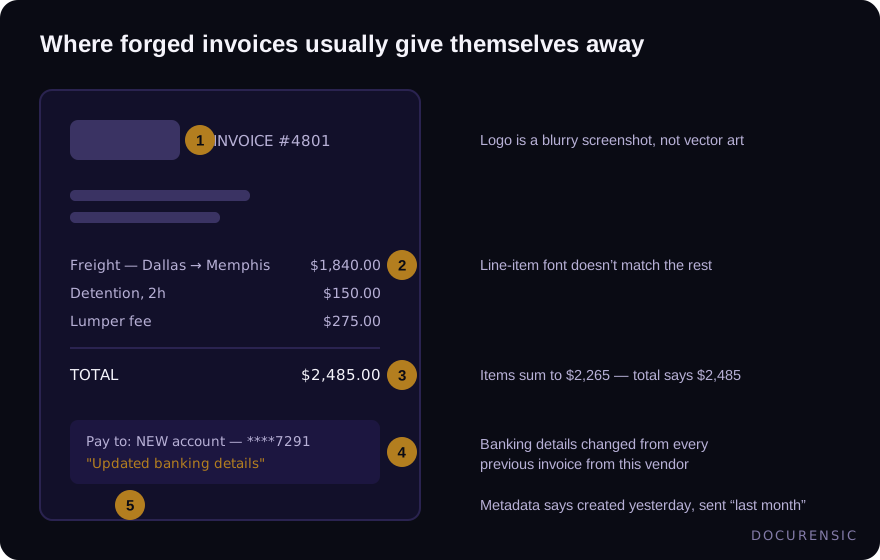
The single most expensive pattern in B2B fraud: a familiar vendor "updates their banking details" on an otherwise normal invoice. Nothing else changes. The excuse is always mundane — new bank, new entity, accountant's advice.
The fix is procedural, not forensic: verify any banking change through a channel you already had, like the phone number from last year's contract. Never the contact details printed on the invoice itself — those belong to whoever wrote it.
2. The math doesn't quite work
Add the line items yourself. On altered invoices, someone bumps the total (or one line) and forgets the arithmetic has to agree. A subtotal that's off by the price of one line item is a classic paste job.
It sounds too dumb to be real. It's one of the most common things automated scanners flag.
3. One line in a different font
Edit a PDF invoice and your editor substitutes fonts. The result: eight lines in the original typeface, one line — usually the important one — in a near-identical substitute. Squint at the digits, or better, let font-level analysis compare them character by character.
4. A blurry logo on a crisp document
Machine-generated invoices have vector logos that stay sharp at any zoom. A logo that pixelates when you zoom in was pasted from a screenshot — which means this invoice wasn't produced by the vendor's system.
5. Metadata that contradicts the story
The invoice says March. The PDF says it was created on Tuesday with a design tool. Every file carries these dates and tool names, and forgers routinely forget them. Checking takes fifteen seconds in any PDF reader's document properties.
6. An invoice number that doesn't fit the sequence
Pull the vendor's last five invoices. Real numbering has a rhythm — sequential, date-prefixed, whatever their system does. A number that breaks the pattern, or worse, duplicates one you already paid, is worth a call.
7. Round numbers where there shouldn't be any
Legitimate freight, utilities and materials invoices are full of ugly numbers: $1,847.32, 13.7 hours. A supposedly itemized invoice that lands on a perfectly round total didn't come from a metering system. One round number means nothing; a pattern of them across one vendor is a signal.
8. Urgency that skips your process
"Overdue — pay today to avoid service interruption" on the first invoice you've seen from them. Pressure exists to beat your verification steps. Any invoice that arrives pre-loaded with reasons not to check it deserves the opposite treatment.
9. A vendor nobody can quite place
The invoice is fine; the vendor is the fiction. Small amounts, generic services ("consulting", "maintenance"), just under the approval threshold. Before first payment to any new vendor, spend two minutes confirming the company exists — registration, address, working phone. That check belongs in onboarding, not in the payment run.
Making the checks stick
A checklist nobody runs doesn't stop anything. The teams that catch this stuff make the checks automatic: every incoming invoice document gets scanned for the technical flags (fonts, metadata, math, editing traces) the moment it arrives, and rules route anything suspicious — like an invoice over a threshold with a banking change — straight to a human before it can be paid.
Frequently asked questions
What's the most common invoice fraud?
Payment-diversion fraud: a real-looking invoice from a known vendor with changed bank details. It works because everything about the invoice is real except the account number.
Can automated tools really detect a forged invoice?
They detect the technical traces forgery leaves — edited PDFs, font substitution, metadata contradictions, broken arithmetic — and they do it consistently on every document, which humans can't. What they can't do is confirm a business relationship. Use both.
Should small businesses worry about invoice fraud?
Arguably more than large ones. Fraudsters target companies too small to have segregation of duties — the same person who receives the invoice approves and pays it. Fixed verification steps for new vendors and banking changes are the cheapest insurance there is.
How do I verify a supplier I've never worked with?
Confirm the registration, the address, and a phone number that answers, from sources other than the invoice. A business verification lookup compresses most of that into one search.
Check the PDF you are holding
Run a free PDF X-Ray in your browser — it recovers text from the file’s earlier revisions, so you can see what a value was before it was changed. No account needed.
Keep reading
8 Accounts Payable Fraud Controls That Actually Get Used
Controls fail when they're annoying. Eight AP fraud controls teams actually follow — from vendor master hygiene to callback verification and document forensics.
The Two-Invoice Trade: Customs Undervaluation and the Paper That Hides It
Undervalued commercial invoices dodge duties, launder value, and expose importers to seizure. How the double-invoice game works and how compliance teams catch it in the paper.
Expense Report Fraud: 8 Small Leaks That Add Up Fast
Expense fraud is rarely a heist — it's a slow leak that hides in the volume. The eight patterns behind most of it, and how to catch each without interrogating every report.