Faked Screenshots: The Cheapest Forgery in the Book
Screenshots became the default 'proof' people submit — and they're the easiest forgery there is. Why a picture of a screen should count for so little, and how fakes give themselves away.

The forgery you're most likely to be shown this month isn't a doctored passport or a cloned contract. It's a screenshot. A screenshot of a payment confirmation, a bank balance, a shipping notification, a chat message, an order status. Screenshots have quietly become the default "evidence" people submit to prove something happened — and they're the cheapest forgery in existence, because faking one requires no special skill and no special tools. Edit a page in the browser, screenshot it. Change some text in an image editor. Done.
Why screenshots are trusted far too much
A screenshot feels like a neutral capture of reality — a photo of a screen, surely hard to fake. That instinct is exactly wrong. A screenshot is just an image, and images are the single easiest document type to alter convincingly. Worse, screenshotting destroys the evidence that would let you verify the original: the moment you screenshot a webpage or an app, you've thrown away the underlying source, the metadata, the anything-verifiable, and kept only a picture that any image editor can rewrite.
So when someone sends you a screenshot as proof — "here's my payment confirmation," "look, it shipped," "see, they agreed" — you're being handed the least verifiable form of the most fakeable medium. That deserves suspicion, not a nod.
How faked screenshots give themselves away
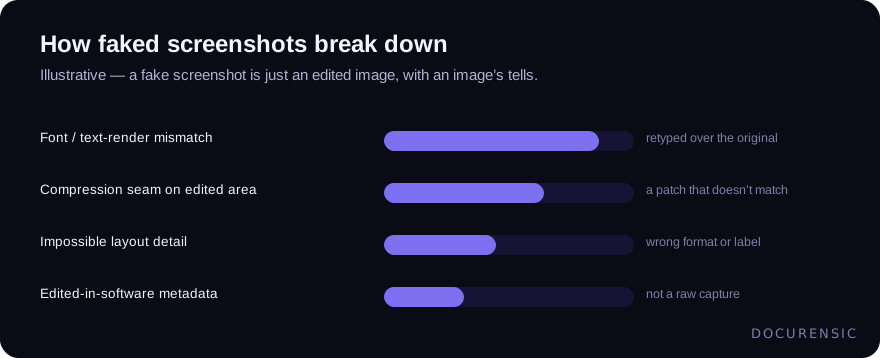
Because a fake screenshot is an edited image, it carries the same tells as any manipulated image:
- Font and alignment mismatches. Edited text rarely matches the app's real rendering exactly — a number in a slightly different font or weight, characters off the baseline, spacing that's uneven where the original would be pixel-perfect.
- Compression and quality seams. A region that was pasted or retyped often has different compression artifacts than the surrounding image — a patch that's too clean or too noisy.
- Layout that doesn't match reality. Faked interfaces get details wrong: a balance with the wrong number of decimals, a timestamp format the real app doesn't use, a status label that doesn't exist.
- Editing traces in the file. A screenshot re-saved by image-editing software says so in its metadata — a "screenshot" that passed through an editor is a screenshot someone worked on.
What to do instead
The real fix is to stop accepting screenshots as proof of anything that matters. A screenshot of a payment isn't a payment; the payment is verifiable at the source. A screenshot of a shipment isn't a shipment; the carrier has the record. Wherever a screenshot is offered as evidence, prefer the verifiable original — the transaction record, the system of truth, the thing that can't be edited in a browser's dev tools.
When you can't get the original and the screenshot is all you have, treat it as an image to authenticate rather than a fact to accept. The same image forensics that catch a photoshopped photo catch a faked screenshot, because that's exactly what it is. But the deeper habit is the important one: the easier something is to fake, the less it should count as proof, and nothing is easier to fake than a picture of a screen.
Have the image examined
Upload the picture and Docurensic runs error-level analysis, JPEG-ghost, copy-move and noise-floor checks on it, and reads its camera and editor record. Free to start.
Keep reading
The Document Remembers: Recovering What a PDF Used to Say
Change a PDF and save it, and most software leaves the old version physically inside the new one. Sometimes the amount before the edit is still sitting there, waiting to be read.

EXIF Data: What a Photo Quietly Reveals About a Claim
A photo carries a hidden layer of data — when, where, and with what it was taken. How EXIF corroborates a claim or contradicts it, and why missing metadata isn't a verdict.
Copy-Move Forgery: The Most Common Image Edit Nobody Notices
Cloning a region of the same image is the forger's favorite move — the borrowed pixels come pre-matched. How copy-move detection works, and where it shows up in documents.