The Padlock Lies: What HTTPS Actually Proves
The padlock is the most misunderstood symbol on the internet. It certifies the pipe, not the shop — and almost every phishing page you will ever see has one.
Somewhere in the mid-2010s the browser vendors won an argument they had been losing for twenty years. Encryption went from a thing banks bought to a thing everyone had, certificates went from expensive to free, and by 2020 the overwhelming majority of page loads were over HTTPS. It was a genuine public-good victory.
It also handed every phishing operator on earth a free trust badge, because the public had been taught for a decade to "look for the padlock."
Key takeaways
- A certificate proves the connection is private and the hostname matches. It says nothing at all about who is on the other end or whether they are honest.
- The common certificate today is domain-validated: issued automatically, free, in about ninety seconds, to anyone who can prove they control the domain — including the person who registered it this morning.
- The useful questions are who the certificate was issued to, when, by whom, and whether that matches what the page claims to be.
- Certificate age is quietly one of the strongest signals available: phishing infrastructure is disposable, and disposable things are new.
What the padlock is actually certifying
Transport Layer Security does two jobs and stops. It encrypts the traffic between your browser and a server, so that nobody sitting between you can read it or change it in flight. And it checks that the certificate the server presents was issued for the hostname you asked for, by an authority your browser already trusts.
Both of those are real and valuable. Neither is a statement about the business.
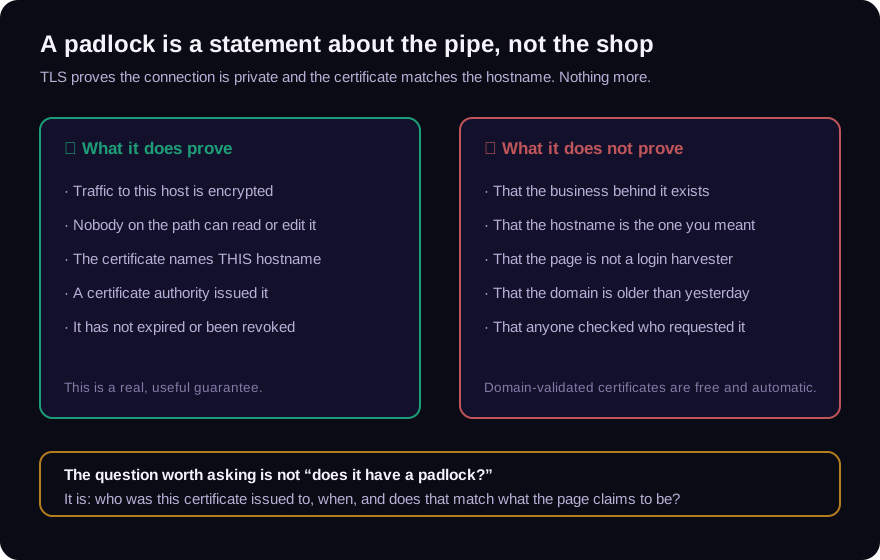
The gap between those two things is where the confusion lives. "This connection is private" reads, to a normal human being, as "this is safe." It is not. It means your credentials will reach the criminal without being intercepted on the way.
Three kinds of certificate, and why you only ever see one
Certificates come in three validation levels, and the distinction used to matter visibly.
Domain validated (DV). The authority checks one thing: can the requester demonstrate control of the domain? Usually by publishing a file at a given path or a record in DNS. It is fully automated, it is free, and it takes about a minute and a half. This is now the overwhelming majority of certificates on the web, and it is the correct default — universal encryption would be impossible otherwise (letsencrypt.org).
Organization validated (OV). The authority does some checking of the legal entity behind the request. Slower, costs money, and — critically — browsers stopped showing you any difference.
Extended validation (EV). A much heavier identity check. This is the one that used to paint a green company name in the address bar. Browsers removed that treatment around 2019, after research showed users did not notice it, did not understand it, and were not protected by it.
So the practical situation is this: almost every certificate you encounter is DV, and even when a site has gone to the trouble of OV or EV, your browser renders it identically. The padlock is the same padlock for a national bank and for secure-chase-verify.ru.
What to read instead
The certificate is still worth reading. You just have to look past the icon at what the document says.
Who is it issued to? DV certificates name a hostname and nothing else — the subject organization field is empty. That absence is not damning on its own (most legitimate small sites are DV too), but a payment portal or a bank login that is DV-only is a real mismatch between the stakes and the credential.
When was it issued? This is the number I would keep if I could only keep one. A certificate minted four hours ago on a domain registered yesterday, presenting a login form for a fifteen-year-old brand, is not a coincidence. Legitimate certificates get renewed constantly, so a recent renewal means nothing — but a first issuance that lines up exactly with the domain's registration date, both within the last week, is a shape worth stopping on.
Does the hostname match what the page claims? Certificates cover specific names, and the list of alternate names is public. A certificate for cdn-assets-7734.example that happens to also cover the phishing hostname is a very different artifact from a wildcard certificate on a company's own domain.
Is it consistent with the rest of the infrastructure? A real business tends to have a coherent footprint: mail records, a sensible nameserver, a certificate whose issuer matches the hosting arrangement. Fraud infrastructure is assembled from whatever was cheapest that week, and the pieces do not match.
The part where the certificate is genuinely bad news
There is one direction where TLS gives you a hard answer rather than a soft one. If the certificate does not validate — expired, hostname mismatch, self-signed, an untrusted issuer, a broken chain — that is not a formality. It means the browser cannot establish that you are talking to who you think you are talking to.
People click through these warnings constantly, usually because an internal tool trained them to. It is worth un-learning. A certificate error on a site asking for money or credentials is the one TLS signal that should stop you cold, because it is the only one where the protocol is actually reporting a failure rather than reporting a success you have over-interpreted.
Why this matters beyond the browser
The padlock problem is a specific instance of a general one, and the general one runs through everything we look at: a security control that succeeded is not the same as a thing that is trustworthy. A digitally signed PDF proves the bytes have not changed since signing — not that the contents were true when signed. A DMARC pass proves the message came from the domain it claims — not that the domain belongs to your supplier. A notary's stamp proves someone appeared and was identified — not that the document they signed says anything accurate.
Each of these gets read as a verdict when it is really one constrained assertion. The discipline is to keep asking "proves what, exactly?" and to notice how narrow the honest answer usually is. We made the same point about what a signature actually seals, and it is the same failure mode.
Doing it without opening the site
You should not have to load a suspicious page to inspect its infrastructure — that is precisely the visit you were trying to avoid. Our free URL checker completes the handshake from our servers, reads the certificate the site actually presents, pulls the domain's registration record, checks the mail and DNS policy, and reports whether the risk signals corroborate one another or just look alarming in isolation. No account, nothing stored, and you never load the page yourself.
The padlock will still be there. Now you know what it is promising you, and what it isn't.
Frequently asked questions
Is a website with HTTPS safe?
No. HTTPS means the connection to that website is encrypted and the certificate matches the hostname. It carries no information about the honesty of the site's operator. Most phishing pages use HTTPS, because certificates are free and automatic.
Can a scammer get a real SSL certificate?
Yes, trivially. Domain-validated certificates are issued automatically to anyone who can show control of a domain, which the person who just registered it obviously can. There is no identity check involved.
What does it mean if a certificate was issued today?
On its own, very little — certificates are renewed all the time. It matters when it converges with other things: a domain registered in the same window, no mail records, a brand name in the hostname that does not belong to the registrant. That combination is the signature of infrastructure built for one short campaign.
Should I ignore browser certificate warnings?
No. A certificate warning is the one case where TLS is reporting an actual failure rather than a success you might over-read. On any page asking for credentials or payment, treat it as a stop, not a speed bump.
Check the email you are holding
Paste a raw message header into the free analyzer to see its authentication results and the route it actually travelled. No account needed.
Keep reading
Trust Seals and Badges: The Cheapest Credibility Online
A trust seal is a picture. Copying a picture takes one right-click. Yet a row of badges in a website footer still moves purchase decisions more than almost anything else on the page.
One Character Off: How Lookalike Domains Get Paid
The most effective domain in payment fraud is not a hacked one. It is a real domain, correctly configured, that differs from your supplier's by a single character nobody reads.
Fake Proof-of-Funds Letters: Money That Exists Only on Paper
POF letters grease real estate deals, trade transactions, and investment schemes — and they are trivially forged. What a real one proves, what a fake one costs, and how to verify.