What Is Document Forensics? A Plain-English Guide
Document forensics is the discipline of reading the evidence documents carry about themselves. Here's what it examines, how the layers fit together, and what it can and cannot prove.
Document forensics is the practice of examining a document's internal evidence — its structure, metadata, fonts, and images — to work out where it really came from and whether it's been altered. Not what the document says: what the document is.
The distinction matters more every year. Business now runs on files: invoices, statements, contracts, IDs, certificates, bills of lading. Most get glanced at by a busy human and filed. And the tools for producing a convincing fake — a photo editor, a PDF editor, increasingly a prompt — sit on every desk.
The good news is that faking a document's appearance is easy, but faking its forensics is hard. Editing leaves traces. The discipline is knowing where they hide.
The layers, from the outside in
Serious document examination isn't one clever trick. It's a stack of independent checks, each looking at a different kind of evidence, with a verdict that comes from how they agree.
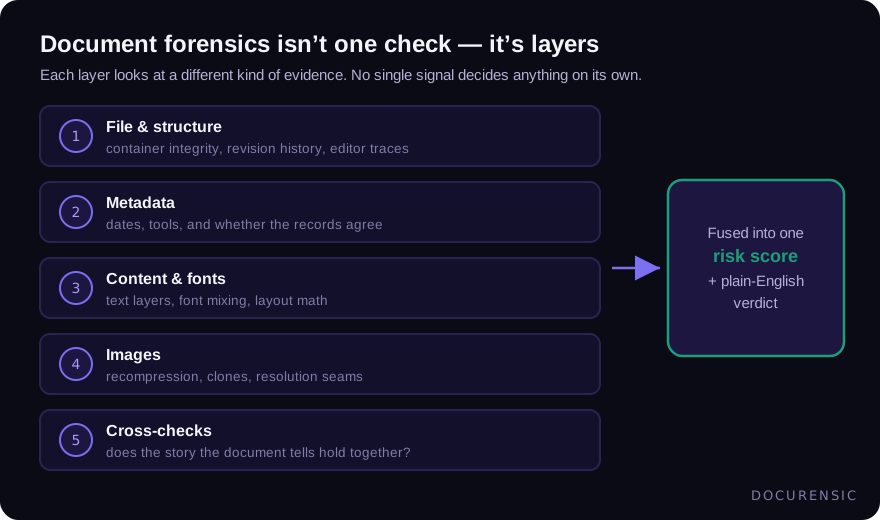
File and structure. Before reading a word of content: is this file what it claims to be? PDFs, Office documents and images all have internal structure — object trees, revision markers, byte layouts — that records how the file was built. A PDF that's been saved four times physically contains its own editing history. This layer reads it.
Metadata. The file's account of itself: creation and modification dates, the software that produced it, sometimes the author and the template it started from. Rich on its own, and richer when cross-checked — we wrote a full guide to PDF metadata because it earns one.
Content and fonts. What's actually on the page, examined typographically and mathematically. Does one number sit in a subtly different font than its neighbours? Do the line items sum to the total? Does the layout grid line up, or does one block sit a half-millimetre off — the signature of a paste?
Images. For scans and photos: compression analysis (an edited region responds differently to recompression than the rest of the picture), clone detection (the same pixels appearing twice), resolution seams, and lighting inconsistencies.
Cross-checks. The layer where findings become judgement. Each signal alone has innocent explanations. A modified date — someone flattened the file. A font substitution — a converter did it. The question the final layer asks is whether the combination has an innocent explanation: a machine-issued receipt with an editing tool in its producer chain, a modification date after issue, and one line in a substituted font does not.
What it can and can't do
Worth being blunt about both directions.
It can detect the traces editing leaves: revision history, metadata contradictions, font substitution, image splices, broken arithmetic. It does this consistently, file after file, at a speed no human review matches.
It can't verify that the underlying facts are true. A perfectly authentic invoice from a fraudulent company is still authentic as a document. That's why document forensics belongs inside a wider verification picture — is the counterparty real, do the details match history, does the story hold? (Company verification is its own discipline.)
And it deals in probability, not certainty. An honest forensic result reads like "multiple independent editing signals, no innocent pattern we recognize" — which is exactly the posture a well-built scanner should take: score, verdict, and the evidence behind both, so a human can check its work.
Who actually uses this
The pattern repeats across industries: money or obligations move on the strength of a document somebody sent you. Freight brokers verifying carrier paperwork before handing over a load. Lenders reviewing pay stubs and bank statements. Insurers checking claim receipts. HR teams looking at diplomas and references. Legal teams establishing whether the contract in dispute is the contract that was signed. The use cases differ; the forensics underneath are the same.
Frequently asked questions
Is document forensics the same as fraud detection?
They overlap but aren't identical. Document forensics examines files for authenticity and tampering; fraud detection is the broader business process that also covers identity, transactions and behaviour. Forensics supplies some of fraud detection's strongest evidence.
Do I need special software?
For a one-off question, a careful manual review — metadata, fonts, arithmetic — gets you surprisingly far, and costs nothing. At any volume, automation stops being optional: nobody manually inspects two hundred invoices a week, which is precisely what fraudsters count on.
How accurate is automated document forensics?
Honest answer: it depends on the forgery. Casual edits (the majority) leave abundant traces and get caught reliably. Sophisticated regeneration — rebuilding a fake from scratch in the original software — leaves fewer traces, which is why serious tools report calibrated risk rather than binary certainty, and why process checks around the document still matter.
What file types can be examined?
Anything with internal structure: PDFs richest of all, Office and email formats, and images (where the analysis leans on compression and pixel-level evidence rather than document structure).
Check the PDF you are holding
Run a free PDF X-Ray in your browser — it recovers text from the file’s earlier revisions, so you can see what a value was before it was changed. No account needed.
Keep reading
Chain of Custody for Digital Documents: Making Evidence Hold Up
A forensic finding is only as strong as the custody story behind the file. Hashes, handling, and documentation — how to keep digital document evidence defensible.
When Was This Really Made? A Field Guide to Document Time
Documents carry more clocks than people expect — and fraud usually breaks at least one. Where timestamps live, which ones lie easily, and how to read them together.
The Free Document Forensics Toolkit
ExifTool, pdfid, qpdf, mutool, FotoForensics and the rest — what you can genuinely establish about a suspicious document with software that costs nothing, in what order, and the four things free tooling cannot do.