Document Workflow Automation: A Practical Guide
Where automation actually saves time in document-heavy work, which checks belong in the pipeline, and how to keep people on the decisions that matter.
Nobody staffs a team because they love retyping invoices. Document-heavy work exists because files arrive as email attachments, uploads, and scans — and someone has to turn each one into a decision. Pay it. File it. Flag it. Chase the missing page. Document workflow automation is the craft of making most of those decisions happen without a person in the middle, without losing the judgment a person would have brought.
This is the practical version of that story: what to automate first, where verification belongs in the pipe, and how to avoid building a robot that just makes bad decisions faster.
What "document workflow automation" actually covers
It helps to split the phrase into three layers, because vendors tend to sell one and imply the others.
Capture is getting documents into the system at all — a watched inbox, an upload page, a cloud folder that syncs, an API. Unglamorous, and the layer where most real-world failures happen (the PDF that never arrived, the version nobody can find).
Understanding is classification and extraction: this file is an invoice, the total is $4,180, the vendor is Meridian Supply, it's due on the 28th. This is the layer with all the demo appeal.
Action is what happens next: route to the right approver, hold anything unusual, notify the channel that cares, write the record into the accounting system. It's the least flashy layer, and it's where the hours actually go — because until action is automated, a human still touches every document, just with nicer software.
If you're evaluating tooling, judge it by the third layer. Extraction that ends in "and then we export a spreadsheet" hasn't automated the workflow. It's redecorated it.
Map the workflow you already have
You can't automate a process you can't describe. Before configuring anything, pick one document type — say, vendor invoices — and walk one real document through your current process, writing down every touch. Who opens it? What do they check? Where do they look things up? What makes them hesitate?
The touches will sort into three buckets: moving the document (forwarding, saving, renaming), checking it (does the math add up, is this vendor real, did we already pay this), and deciding on it (approve, reject, escalate).
Machines are excellent at the first two buckets. The third is where you should be selective. A decent rule of thumb: automate a decision when you can write down, in one sentence, the exact condition under which you'd make it — and route to a person when you can't.
Decide what a machine should check
Checks are the heart of the pipeline, and the ones worth automating cluster into four families:
- Authenticity. Was this file edited after it was created? Does its internal structure match what it claims to be? This is document forensics, and it's the check humans are worst at doing by eye — which makes it the best candidate for automation.
- Completeness. Are the required fields present and readable? Is a page missing? Is the scan legible enough to trust?
- Business rules. Is the amount within the approver's limit? Is the vendor active? Are the red flags that matter to your process — banking changes, rush language, round numbers — showing up?
- Duplicates. Have we seen this document, or a suspiciously similar one, before?
Notice what's not on the list: "is this fraud, yes or no." Automation is better at holding ambiguous cases than at convicting them.
Write rules people can read
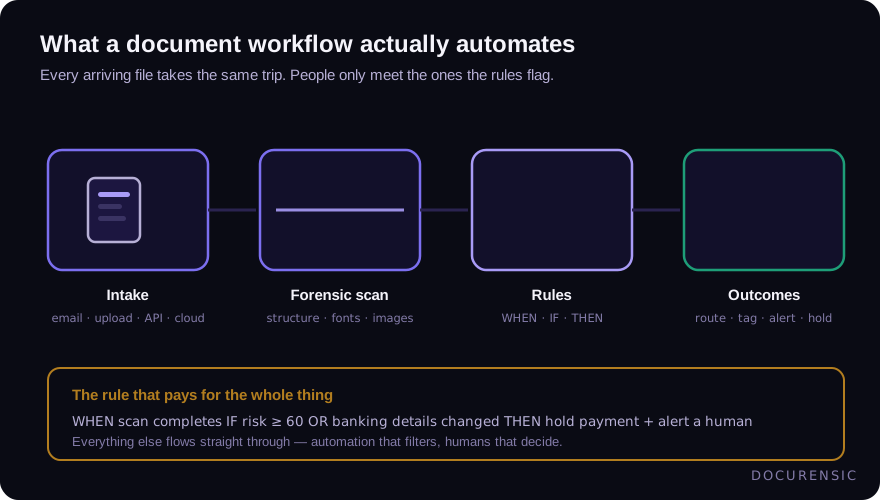
The action layer runs on rules, and the format matters more than it looks. A rule like WHEN a scan completes, IF the risk score is 60+ OR the banking details changed, THEN hold payment and notify AP can be read, audited, and argued about by the people who own the process. The same logic buried in a script cannot.
Legible rules pay off twice. During an audit, you can show exactly what the system does and when it started doing it. And when a rule misfires — every rule eventually misfires — anyone can see why, instead of filing a ticket with engineering.
That's the design behind Smart Workflows in Docurensic's automation layer: triggers, conditions, and actions you can read out loud. Whatever tooling you use, insist on that property.
Keep humans on the exceptions
An automated pipeline doesn't remove people; it concentrates them. Everything routine flows through; everything unusual lands in an exception queue. That queue is now the most important surface in the process, and it deserves actual design.
- Every exception has an owner. A queue nobody owns is a place documents go to age.
- Every exception type has a paved path. "Risk score high" should arrive with the evidence attached — the signals, the pages, the comparison — not a bare number and a shrug.
- Every exception has a clock. Decide the response time you're committing to before the queue exists, not after it backs up.
The goal was never zero human touches. It's human touches only where judgment matters.
Measure the loop, then tighten it
Four numbers tell you whether the pipeline is earning its keep:
- Straight-through rate — the share of documents that complete with no human touch.
- Exception rate by reason — which rules fire, how often, and what reviewers decide afterward.
- Time-to-decision — median and worst case, from arrival to outcome.
- Rule performance — a rule that never fires is dead weight; a rule that fires on half your volume is a threshold in the wrong place.
Review them monthly at first. Retire what never fires, split what fires too broadly, and raise thresholds only when review outcomes say the holds were unnecessary — not because the queue feels long.
Frequently asked questions
Is document workflow automation the same as RPA?
They overlap, but no. RPA (robotic process automation) mimics human clicks in existing interfaces — it's glue for systems with no API. Document workflow automation is about the pipeline itself: intake, checks, routing, decisions. Plenty of teams use both; plenty of modern stacks need no RPA at all because their tools expose APIs and webhooks.
Where should fraud checks sit in an automated document pipeline?
At intake, before the document influences anything downstream. Once an invoice is matched, approved, and scheduled, every system that touched it has implicitly vouched for it. Checking authenticity first — while the file is still just a file — is cheaper, and it catches problems while they're still reversible.
Is this worth it for a small team?
It depends on volume and stakes, not headcount. A three-person operation handling a few high-value documents a week benefits more from verification rules than from routing automation. A team drowning in volume benefits from both. Start with the checks that protect money, then automate the movement.
Check the PDF you are holding
Run a free PDF X-Ray in your browser — it recovers text from the file’s earlier revisions, so you can see what a value was before it was changed. No account needed.
Keep reading
Chain of Custody for Digital Documents: Making Evidence Hold Up
A forensic finding is only as strong as the custody story behind the file. Hashes, handling, and documentation — how to keep digital document evidence defensible.
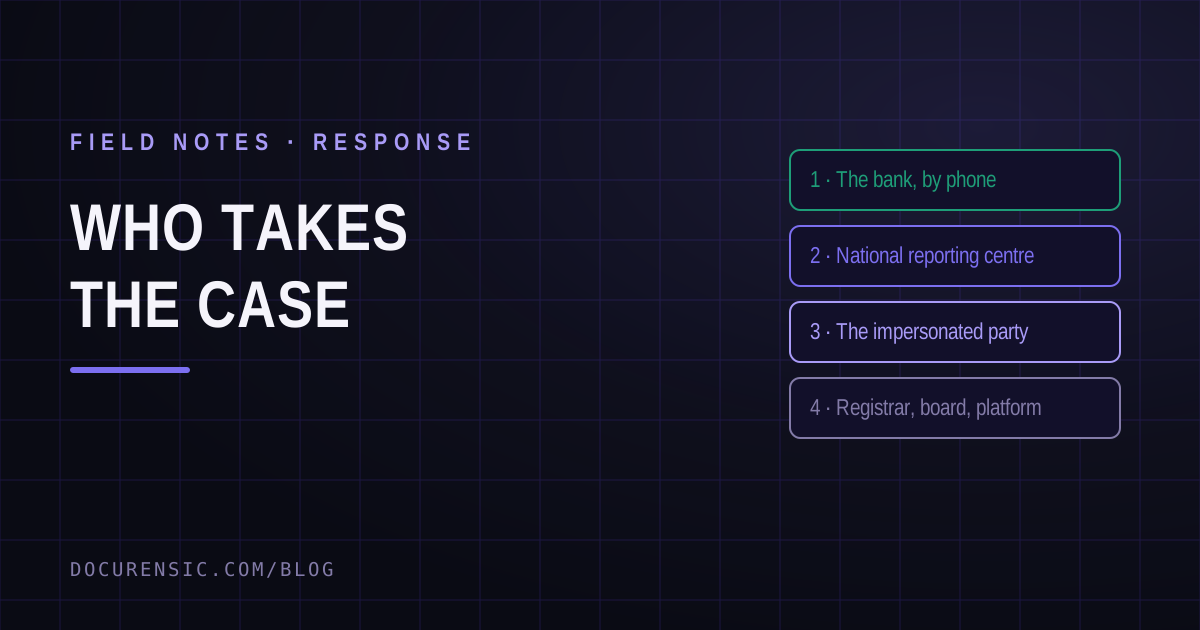
Where to Report Document Fraud: Who Takes the Case
The bank first, within hours, because that is the only step that recovers money. Then the national centres in the US, UK, Canada and Australia — and the four reports almost nobody files that change outcomes most.
When Was This Really Made? A Field Guide to Document Time
Documents carry more clocks than people expect — and fraud usually breaks at least one. Where timestamps live, which ones lie easily, and how to read them together.