The Document Remembers: Recovering What a PDF Used to Say
Change a PDF and save it, and most software leaves the old version physically inside the new one. Sometimes the amount before the edit is still sitting there, waiting to be read.
There is a particular moment in document examination that never stops being satisfying. You open a file that claims to be an invoice for eighty-four thousand pounds, you reconstruct the cross-reference table from an earlier state of the same file, you follow it to the object it used to point at, and the number four thousand comes back out.
Not inferred from a suspicious font. Not deduced from a metadata contradiction. The earlier text, physically present, in the file the sender handed over.
Key takeaways
- Most PDF editors save by appending — the new version of a changed object is written at the end and a fresh cross-reference table points at it. The old object is still in the file, just unreferenced.
- That means an altered document frequently still contains the original amount, date, or payee, and it can be reconstructed rather than guessed at.
- Multiple revisions are completely normal. Signing adds one, filling a form adds one, annotating adds one. The revision count is not the finding; what changed between them is.
- When a file is rewritten instead of appended — printed to PDF, flattened, optimised — none of this survives. That is ordinary, and it is not evidence of anything.
Why a PDF grows instead of changing
PDF was designed to be readable from the end. A reader opens the file, seeks to the last few bytes, finds a pointer to the cross-reference table, and uses that table to locate every object in the document. Nothing needs to be scanned front to back.
That design makes a particular kind of save extremely cheap. If you change one object on page three, you do not have to rewrite the file. You write the new version of that object at the end, write a new cross-reference table that points at it (and at the unchanged objects, wherever they already are), and write a pointer to the new table. The file is now a valid PDF with your change in it, and you touched only the tail.
This is called an incremental update, and it is in the format specification on purpose (iso.org). It exists for good reasons. It is what allows a digital signature to keep sealing the exact bytes it signed while later annotations pile up behind it — without it, adding a comment to a signed contract would break the signature.
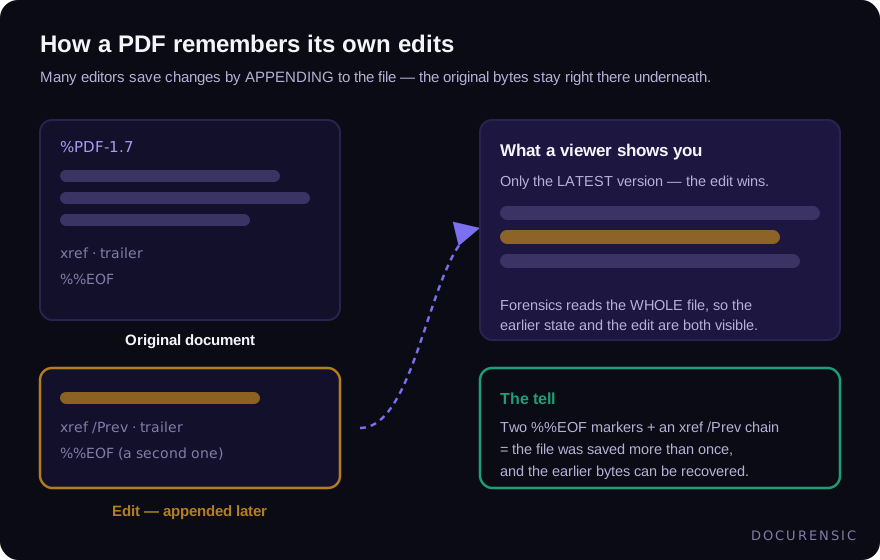
It also has a consequence its designers understood perfectly well and document examiners have relied on for two decades: an appended edit leaves the pre-edit document inside the file.
What "recovered value" means in practice
Every object in a PDF has a number and a generation. When an object is replaced by an incremental update, the new copy carries the same object number with a higher generation, and the newest cross-reference table sends readers to the new one. The old one is orphaned, not deleted.
Reconstructing it is mechanical. Find the earlier cross-reference table — each one records the byte offset of the one before it — and read the file as it stood at that moment. Follow object 42 as that table saw it, decode the content stream, and you have the text of the page before the edit.
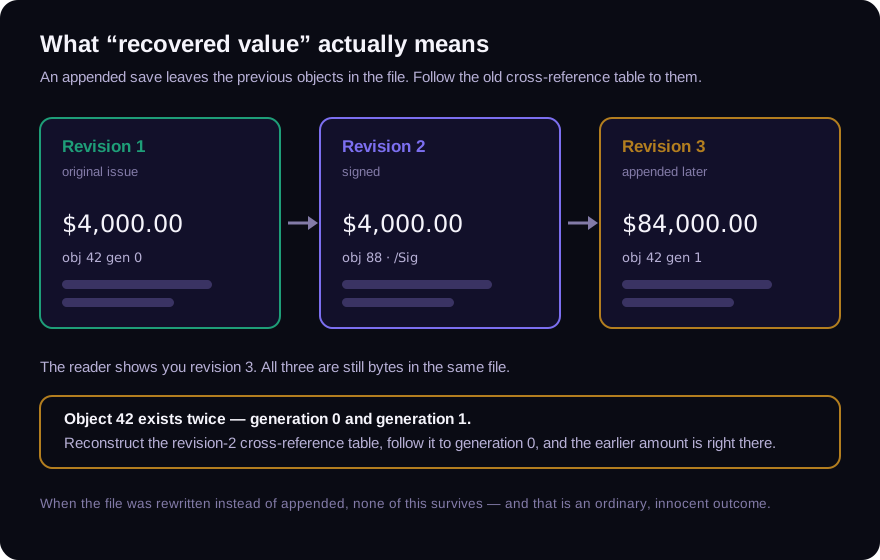
Two properties make this unusually strong as evidence. It is deterministic — anyone with the same file gets the same answer, and it can be repeated in front of a sceptical audience. And it is specific — it does not say "this document shows signs of editing", it says "on page two, this field read £4,000.00 and now reads £84,000.00."
Revisions are not findings
It is worth being blunt about this, because "your PDF has three revisions" is the kind of statement that gets over-read badly.
Revisions are the normal life of a document. A contract that was drafted, signed by one party, signed by the other, and then annotated by a reviewer will have four. A form that someone filled in and saved has two. A file that went through a document-management system may have several that nobody consciously created.
What matters is the relationship between the revisions and the story the document is telling:
- A document presented as an untouched original that carries five appended revisions.
- A signed agreement where a revision after the signature changed something inside the signed area rather than adding a comment beside it.
- A "scanned in 2019" file whose earliest recoverable revision was written by software released in 2024.
- A revision that changed exactly one number, in exactly the field that decides the money.
Each of those is a question about consistency, not a count.
The signature case, specifically
Signatures make the revision structure legally interesting, because a signature covers a byte range — a specific stretch of the file — and a later incremental update sits outside it.
This is by design: it is what lets you add an annotation to a signed document without invalidating the signature. Your PDF reader will usually tell you, in a phrase most people skim past, that the document "has been changed since it was signed" while still reporting the signature as valid. Both statements are true at once, and the difference between them is the whole question.
So the useful reading is not "is the signature valid" but "what does the signature actually cover, and what arrived afterwards?" A comment bubble added after signing is fine. A changed payment schedule added after signing is a very different artifact wearing the same green tick. We walked through the mechanics of that in how to tell if a contract was altered after signing.
When there is nothing to recover
Plenty of ordinary workflows destroy the appended history completely:
- Printing to PDF produces a brand-new single-revision file.
- Flattening merges layers and annotations into fresh page content.
- Optimising or linearising rewrites the whole document for fast web viewing.
- Many export paths simply always write a clean file.
A file with one revision and no recoverable prior state is the most common thing in the world. It is also, unfortunately, what a careful forger produces — deliberately or by accident — which is why the absence of recoverable history is never treated as a clean bill of health.
This is the same discipline that runs through the whole field: missing evidence is not exculpatory evidence. An examination that cannot see a layer should report that it cannot see it, not score it as fine. It is the reason our coverage notes exist, and the reason "nothing surfaced" and "nothing happened" are kept as separate sentences.
Structure versus metadata
People sometimes fold this into "checking the metadata", and the distinction is worth keeping sharp.
Metadata is what the file claims about itself: title, author, producer, creation date, modification date. It is a set of fields somebody typed or a program filled in, and it can be rewritten in seconds by anyone with a text editor and patience.
Structure is a side-effect of how the file was written. Nobody types a cross-reference table; it is generated by the act of saving. Falsifying it convincingly means producing a file whose internal byte offsets, object generations and revision chain all tell one consistent false story — which is dramatically harder than editing a date field, and which very few people attempting document fraud bother to attempt.
Metadata is testimony. Structure is a fingerprint.
Look inside a file yourself
Everything above is running, right now, in our free PDF X-Ray. Upload a PDF and it reports the revisions it can recover, any earlier values still addressable inside the file, hidden and covered text, what each signature actually seals, and — honestly — which checks it could not complete on that particular document. No account, and the file is discarded with the response.
Try it on something you produced yourself first. Save a document, change one number, save again, and go looking for the number you replaced. The file remembers more than the person who edited it expected.
Frequently asked questions
Can you recover deleted text from a PDF?
Sometimes. If the change was saved as an incremental update, the earlier version of the affected objects is usually still in the file and can be reconstructed. If the file was rewritten — printed to PDF, flattened, optimised — the earlier state is gone and no tool can bring it back.
Does a PDF with several revisions mean it was tampered with?
No. Signing, form-filling and annotating all add revisions, and document systems add them routinely. The revision count is normal; what changed between revisions, and whether that is consistent with the document's claimed history, is the actual question.
Can someone remove a PDF's revision history?
Yes, easily — saving the file through almost any "print to PDF" or optimisation path produces a clean single-revision document. This is why the absence of recoverable history is treated as no information rather than as a good sign.
Is this the same as PDF metadata analysis?
No. Metadata is editable text the file asserts about itself. Revision structure is created by the act of saving and is far harder to falsify coherently. The two are complementary, and a contradiction between them is itself a finding.
Check the PDF you are holding
Run a free PDF X-Ray in your browser — it recovers text from the file’s earlier revisions, so you can see what a value was before it was changed. No account needed.
Keep reading
What Fonts Give Away: Typography as Forensic Evidence
Every document has a typographic fingerprint — and edits break it. How font substitution, spacing drift, and impossible typefaces expose altered and backdated documents.

Chain of Custody for Digital Documents: Making Evidence Hold Up
A forensic finding is only as strong as the custody story behind the file. Hashes, handling, and documentation — how to keep digital document evidence defensible.

Fake Proof-of-Funds Letters: Money That Exists Only on Paper
POF letters grease real estate deals, trade transactions, and investment schemes — and they are trivially forged. What a real one proves, what a fake one costs, and how to verify.