Reading Email Headers: The Trail a Message Can't Fake
Everything a sender types can be forged. Everything the relay servers stamped on the way through cannot be rewritten after the fact — which is why the headers are where the answer lives.
In this guide
- Key takeaways
- Getting the raw headers
- Step 1 — Authentication, and which result actually counts
- Step 2 — Read the sending domain character by character
- Step 3 — Where does a reply go?
- Step 4 — Walk the relay chain
- Step 5 — The links, without clicking them
- What headers can't tell you
- Do it now
- Frequently asked questions
The visible part of an email is a suggestion. The From name, the From address, the Date, the Reply-To — all of it is typed by whoever composed the message, and none of it is checked by the protocol that delivers it. SMTP was designed in 1982 by people who assumed everyone on the network was a colleague, and the shape of that assumption is still in the format.
What cannot be freely rewritten is the layer underneath: the trail each server stamps on the message as it passes through. Those stamps are added by machines that do not work for the sender, in an order that cannot be retroactively edited, and they are where almost every interesting answer lives.
Key takeaways
- Read authentication results first, but read DMARC as the authoritative one — SPF and DKIM fail routinely on completely legitimate forwarded and mailing-list mail.
- Perfect authentication on a lookalike domain is the most common shape of invoice fraud. Passing is not the same as being who you think.
- The Received chain reads bottom-up: oldest hop last. Time must move forward as you read upward, and every gap should have an explanation.
- Reply-To is the field that gets the money. Check where a reply actually goes before you check anything else in the body.
Getting the raw headers
Every client hides them, and every client hides them somewhere different.
- Gmail — open the message, three-dot menu, Show original.
- Outlook on the web — open the message, More actions, View message source.
- Outlook desktop — File, Properties, then the Internet headers box.
- Apple Mail — View, Message, Raw Source.
You want the block of text that starts with a run of Received: lines. The body is optional for this; the headers alone answer most of the questions.
Step 1 — Authentication, and which result actually counts
Three mechanisms sit on top of SMTP to retrofit some accountability, and the receiving server records what it found in an Authentication-Results header.
SPF asks whether the server that handed over the message was on the sending domain's published list of permitted senders (rfc-editor.org). It breaks the instant a message is forwarded, because the forwarding server is not on the original domain's list. An SPF failure on its own is very weak evidence.
DKIM checks a cryptographic signature over selected headers and the body, using a public key published in the sending domain's DNS. It breaks whenever something rewrites the message in transit — which mailing lists do constantly, by appending footers.
DMARC is the one that matters. It is the domain owner's published policy about what a receiver should do when SPF and DKIM results do not align with the domain in the visible From address. A dmarc=fail is not a technical hiccup: it means the organisation whose name is on the message has published a policy saying this message is not theirs.
So the reading order is DMARC, then the other two as context. A message with spf=fail dkim=pass dmarc=pass was almost certainly forwarded by a colleague. A message with dmarc=fail deserves a phone call before anything else happens.
Step 2 — Read the sending domain character by character
This is the step people skip, and it is the one that costs money.
An attacker who registers exarnple.com and configures it properly will pass SPF, DKIM and DMARC perfectly — for exarnple.com. Every green tick in the analysis is telling the truth. The message really did come from the domain it claims. The domain is just not the one you think you are reading.
At most rendering sizes, rn is indistinguishable from m. So are l and I in a lot of sans-serif faces, 0 and O, and vv and w. Add hyphenated variants (acme-invoices.com), extra words (acme-billing.net), and alternative top-level domains, and the space of convincing near-misses around any brand is effectively unlimited. We went further into the economics of this in one character off.
Read the domain right to left, and read it slowly. The last two labels before the slash are the only part that decides where anything actually goes.
Step 3 — Where does a reply go?
Three fields describe "the sender" and they can all disagree:
- From — what you see. Fully attacker-controlled.
- Reply-To — where your reply is addressed. Also attacker-controlled, and this is the one that collects the answer.
- Return-Path (or envelope sender) — where bounces go. Set at the SMTP layer, and often the field that quietly reveals the real origin.
A Reply-To that differs from From is not automatically wrong; ticketing systems, mailing lists and marketing platforms set it constantly. It becomes a finding when the From is a supplier's real domain and the Reply-To is a free webmail address, a lookalike, or a domain registered last month. That combination is not a configuration quirk, it is the mechanism: the message looks like it came from your supplier, and your reply — with the payment details you were about to confirm — goes somewhere else entirely.
Step 4 — Walk the relay chain
Every mail server that handles a message prepends its own Received header. Prepends, not appends — so the list reads newest-first, and the message actually travelled upward through it. Start at the bottom.
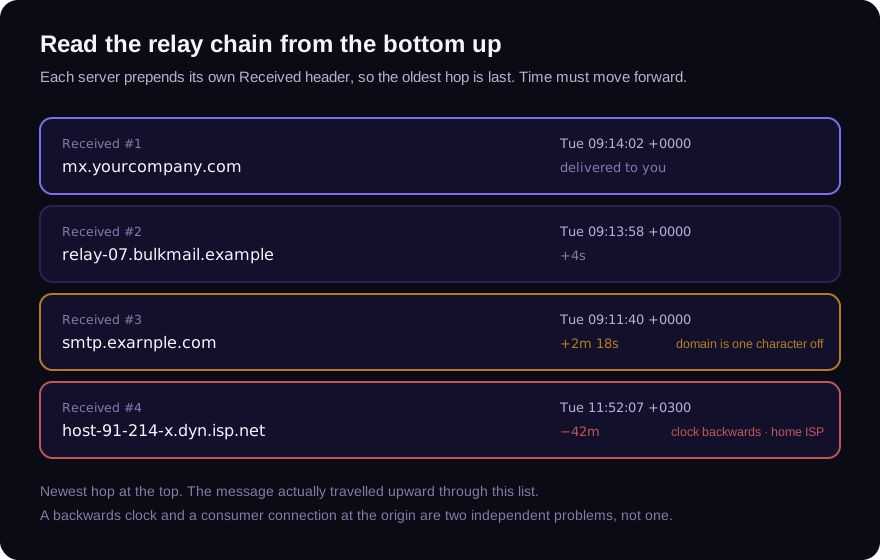
Four things to look for:
Does time move forward? As you read from the bottom hop to the top one, timestamps should increase. A hop whose clock runs backwards relative to the one before it is either a badly configured server or a fabricated header inserted by the sender. Both are worth knowing about; only one is common.
Where did it start? The bottom-most hop is the origin. A message claiming to come from a corporate mail system that entered the internet from a residential broadband connection, or from a hosting provider that nobody sends business mail from, has some explaining to do.
Are the delays plausible? Modern mail is fast. Sub-second hops are normal, a few seconds is normal, and a queue delay of minutes is fine. Hours between two adjacent hops usually means a queue somewhere — worth checking against the claimed urgency of the message.
Does the geography make sense? Timezone offsets are right there in the timestamps. A supplier in Manchester whose mail originates in +0300 is not proof of anything, but it is a question, and questions are what you are collecting.
Step 5 — The links, without clicking them
The last thing worth extracting is every URL in the body. You want them as text, scored offline, and never fetched — because fetching a tracked link tells the sender the message reached a live human who is paying attention, which is precisely the confirmation you do not want to give.
This is also where display text and destination diverge. An anchor that reads https://portal.supplier.com and points at something else is a two-second check that catches an entire class of attack.
What headers can't tell you
Headers describe delivery. They are silent on intent, and on two increasingly common cases.
The first is account takeover. If a fraudster is sending from your supplier's real mailbox, on their real domain, through their real mail system, every check on this page passes — because everything is genuine except the person typing. "The headers were clean" stopped being a defence some years ago. What catches this case is the content: an unexpected change of bank details, a new urgency, a request that breaks the established pattern. Which is why the 60-second bank detail check is a phone call to a number you already had, not a header inspection.
The second is the attachment. If the message is carrying an invoice, a statement or a contract, the headers say nothing about whether that document is authentic. That is a different examination entirely.
Do it now
You can run every step above by hand, and it is worth doing at least once so the shapes become familiar. After that, our free email header analyzer does it in one pass — authentication results, the full relay chain with per-hop delays, identity mismatches, and a passive read on every link — with no account and nothing stored.
Paste the headers. Read from the bottom. The trail is already there.
Frequently asked questions
Which email header is the hardest to fake?
The Received headers added by servers you control or trust — particularly your own receiving server's, which is the top one. A sender can insert fake Received lines below theirs to invent an earlier history, but they cannot alter the stamps added after the message left them.
Does a DMARC pass mean the email is legitimate?
It means the message genuinely came from the domain in the From address. If that domain is a lookalike the attacker registered, a DMARC pass is exactly what you would expect. Authentication answers "is this domain really the sender", never "is this domain the one I meant".
Why do so many legitimate emails fail SPF?
Because forwarding breaks it by design. When a message is forwarded, the forwarding server is doing the sending, and it is not on the original domain's permitted list. This is why DMARC exists and why SPF failures alone are treated as weak evidence.
Can I tell where an email was really sent from?
Often, approximately. The oldest Received header records the connecting address, which gives you a network and usually a country. It is not an identity, and it can be a VPN or a compromised third party — but a corporate message originating on a consumer connection is a legitimate question to raise.
Check the email you are holding
Paste a raw message header into the free analyzer to see its authentication results and the route it actually travelled. No account needed.
Keep reading
Chain of Custody for Digital Documents: Making Evidence Hold Up
A forensic finding is only as strong as the custody story behind the file. Hashes, handling, and documentation — how to keep digital document evidence defensible.
When Was This Really Made? A Field Guide to Document Time
Documents carry more clocks than people expect — and fraud usually breaks at least one. Where timestamps live, which ones lie easily, and how to read them together.
The Free Document Forensics Toolkit
ExifTool, pdfid, qpdf, mutool, FotoForensics and the rest — what you can genuinely establish about a suspicious document with software that costs nothing, in what order, and the four things free tooling cannot do.